SEO in Wix the Practical Guide to Ranking in 2026

A polished Wix site can still sit unseen in Dublin search results while the owner waits for enquiries that never arrive. The pages look right, the contact form works and the business may have a strong reputation offline, but nobody has checked whether Google can understand the services, index the important URLs or connect the site with the searches local buyers make.
That's the gap practical SEO in Wix should close. Wix can support serious organic growth, but only when you treat it as a measurable system rather than a checklist. The work starts with the site's foundations, continues through page-level relevance and technical checks, then feeds into a regular process for improving visibility and qualified leads.
Table of Contents
Why SEO in Wix Matters for Irish Businesses Right Now - Wix has a meaningful Irish user base - Rankings are only the first checkpoint
Getting Your Wix SEO Foundations Right From Day One - Start with the Wix SEO checklist - Build a structure that a buyer can follow - Connect Google and Bing, then verify
On Page Optimisation That Actually Moves Rankings on Wix - Give every priority page a distinct target - Write for intent, not density - Audit before you create more
Technical SEO Controls in Wix and How to Work Around Limits - Separate platform defaults from ownership decisions - Use logs to diagnose instead of guessing - Keep local business information consistent
Speed Mobile and Structured Data for AEO Readiness - Start with commercially important pages - Make pages clear for answer engines - Use a prioritised fix list
Measure Improve and Keep Your Wix SEO Growing - Run a simple review rhythm - Make ownership visible
Why SEO in Wix Matters for Irish Businesses Right Now
A Dublin accountancy firm can publish a polished Wix site with pages for tax advice, payroll and business consulting, then wait months for enquiries that never arrive. The owner may see occasional visits in analytics and blame the platform. More often, the site is aimed at broad topics, its service pages say too little, local relevance is weak, or nobody has checked what Google is indexing.
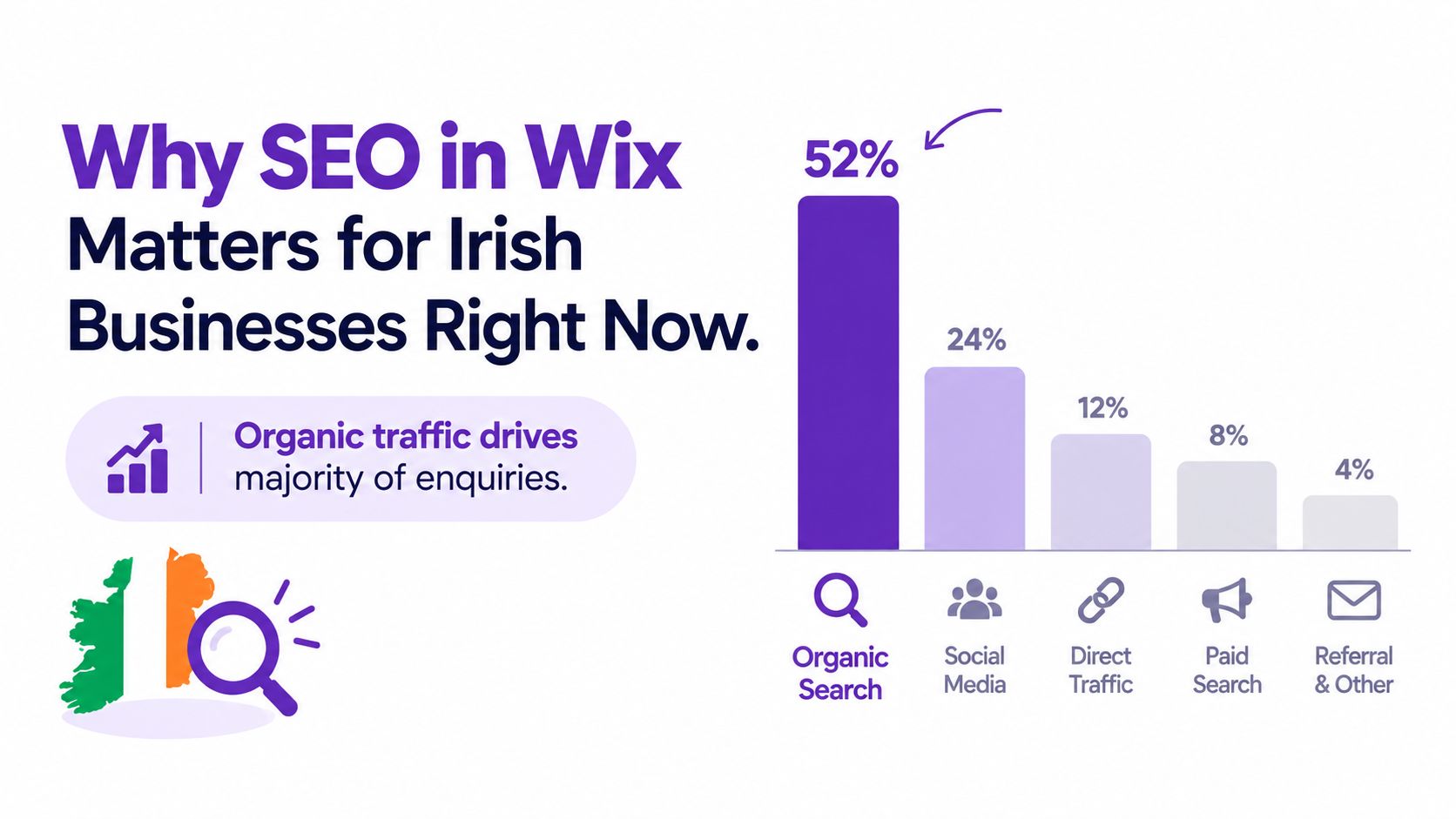
Organic search still carries commercial weight for Irish businesses. An Ireland-focused study reported that organic traffic accounted for 59% of total website traffic in 2024 and 61% in 2025, while Google Search traffic rose by 0.2% over the same period, according to BuiltWith's Ireland SEO and Wix data. Organic traffic also generated 44% of tracked key events in 2024 and 54% in 2025. For an SME, those events can represent an enquiry, booking or other configured conversion.
Wix has a meaningful Irish user base
Wix is widely used in the Irish market. BuiltWith's Ireland usage data lists 15,230 Irish websites using Wix, giving local agencies and business owners a substantial group of sites to improve rather than dismiss as unsuitable for search.
The platform now provides more than page publishing. Wix exposes Google impressions, clicks, average position, query data and bot traffic through its native analytics and SEO reporting environment, as documented in Wix's log data and SEO reporting guidance. That information supports a practical growth process: identify the queries bringing visibility, compare them with leads, and decide which page or technical issue deserves attention.
Wix will not choose the right commercial topics, create persuasive service content or identify every weakness in an SEO strategy. It does give Irish SMEs enough native control and reporting to improve visibility without moving to another CMS. Those reports can also expose the questions people ask, which helps shape content for answer engines and generative search, while local page details and clear contact paths support lead capture.
The practical position: Wix can rank and generate leads, but the platform will not choose the right commercial topics, write convincing service pages or diagnose every strategic weakness for you.
Rankings are only the first checkpoint
A page ranking for an irrelevant informational query does little for revenue. Irish SMEs should connect search visibility with calls, form submissions, bookings and other key events, then check which pages and queries contribute to those actions.
The working process is clear. Set commercial priorities, give each important page one clear job, remove technical obstacles, improve the visitor experience and use Wix reporting to choose the next improvement. That turns SEO in Wix from checklist maintenance into a growth system.
Getting Your Wix SEO Foundations Right From Day One
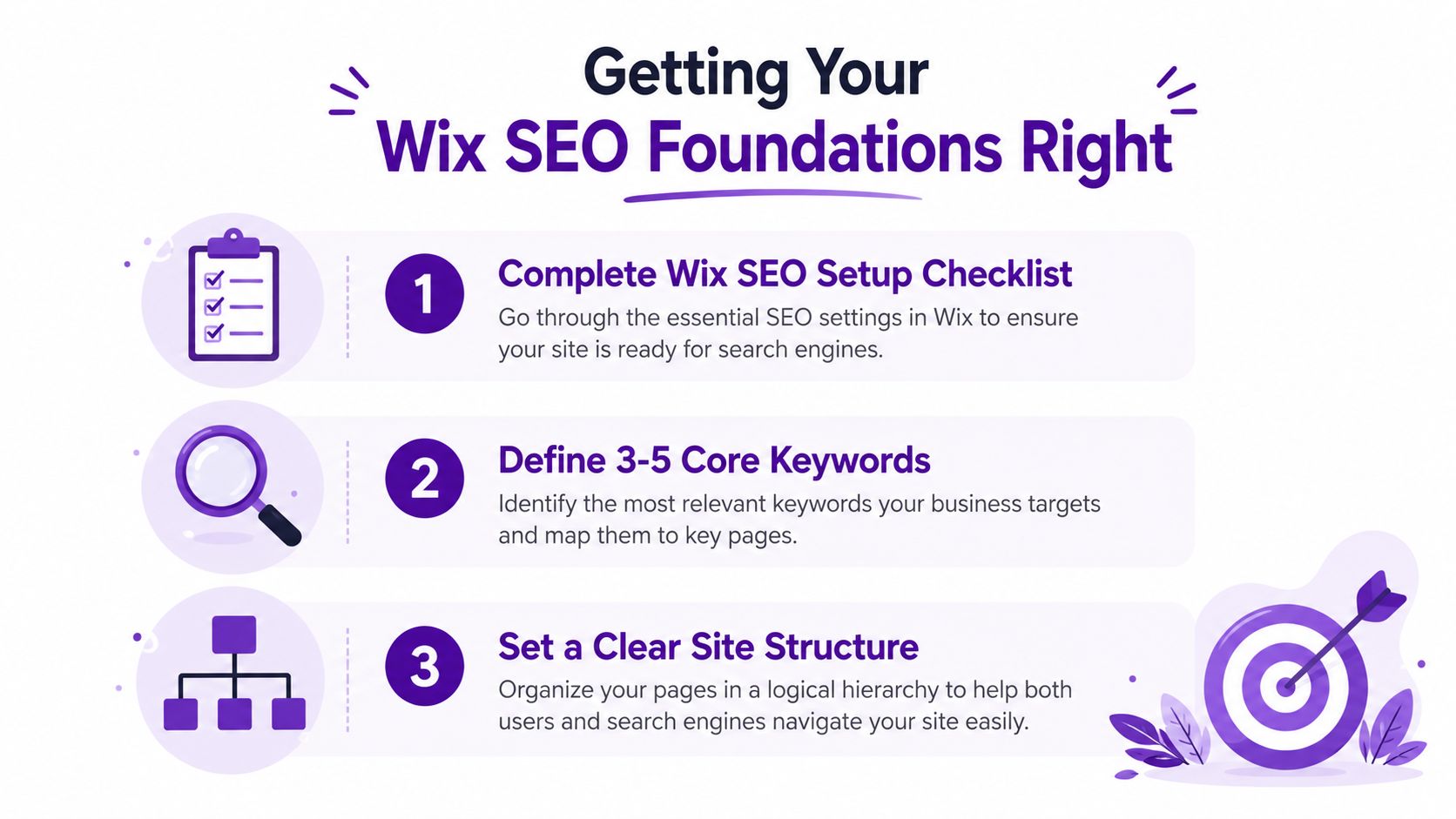
Wix SEO becomes much easier when the launch sequence is treated as a gate, not a set of optional recommendations. Before publishing a new Irish business site, complete the platform setup, define the site's core subjects, make the structure understandable and verify that search engines can access the important pages.
Start with the Wix SEO checklist
Open the Wix SEO setup area and complete the business information carefully. Use the trading name, service descriptions, location details and contact information that customers see elsewhere. For a local business, consistency matters across the website, Google Business Profile, directories and social profiles.
Wix's workflow asks you to define 3 to 5 core SEO topics. Keep these commercially grounded. A Dublin solicitor might choose employment law, commercial contracts, dispute resolution and solicitor Dublin, depending on its actual services. A vague topic such as “professional services” gives the platform little useful direction and gives visitors even less.
Use a keyword research process before committing to the topics. The keyword research service from Scéaled can help organise search themes around intent, location and business value, but the important decision is the page mapping. Each topic should lead to a sensible site section or priority page, not a list of phrases inserted wherever they fit.
Build a structure that a buyer can follow
Keep the main navigation focused on the services and information that support enquiries. A typical SME structure might include:
Core services: Give each important service its own page where the offer, audience and next step are clear.
Locations: Create location pages only where the business serves that area and can provide useful local detail.
Proof: Include case material, qualifications, reviews or process information that reduces purchase uncertainty.
Conversion paths: Make the phone number, enquiry form, booking action or consultation route easy to find.
Wix automatically creates much of the technical framework, but that doesn't remove the need to inspect your page settings. Check that important pages aren't marked noindex, that navigation doesn't hide key services and that draft, duplicate or obsolete pages aren't competing with the intended destination.
Connect Google and Bing, then verify
Wix says its Google and Bing connection process can be completed in minutes and automates the integration. Treat that as implementation convenience, not proof that the site is ready.
Connect the site, then verify the domain and inspect the resulting data. Look for indexed priority pages, unexpected exclusions, response-status problems, bot activity and query impressions. If you skip this stage, you may spend weeks publishing content for pages that search engines can't properly access.
This short walkthrough provides useful platform context before you work through the settings.
Launch rule: Don't publish a content calendar until the business information, priority URLs, indexation settings and search reporting have all been checked.
On Page Optimisation That Actually Moves Rankings on Wix
The Wix Editor gives you direct access to the page elements that shape how search engines and users interpret a URL. The mistake is to fill every field with the same phrase. Strong on-page work gives each page one clear job, matches the wording to search intent and makes the result compelling enough to earn a click.
Give every priority page a distinct target
Start with the pages closest to revenue. For a Dublin consultancy, that might be an advisory service page rather than the blog. Assign one primary topic to the URL, then use related language naturally in the copy, headings, examples and FAQs.
A useful page brief might look like this:
Page element | Practical direction |
|---|---|
Title tag | State the service and relevant location or differentiator |
Meta description | Explain the value of the service and give a reason to click |
URL | Keep the slug short, readable and aligned with the page purpose |
H1 | Describe the page's main offer clearly |
Subheadings | Answer the questions a prospective customer will ask |
Body copy | Explain who the service is for, what happens and why the business is credible |
Images | Use descriptive alt text where the image communicates useful information |
The title tag should sound like a search result written for a buyer, not a keyword container. “Employment Solicitor Dublin | Workplace Advice for Employers” gives more context than repeating “employment solicitor Dublin” several times. The meta description should support the click with a concise explanation of the service, audience and next action.
Write for intent, not density
A page targeting “commercial property solicitor Dublin” needs more than that phrase in the title. It should explain the relevant work, the types of clients served, the transaction or advisory process and how to start a conversation. A page that only changes the location name from another service page creates duplication without creating local relevance.
Use headings to organise the visitor's decision:
What the service covers
Who typically needs it
How the process works
What information to prepare
Why clients choose this firm
How to enquire
Wix's SEO Assistant can flag tasks involving the title, H1, subheadings, body copy, URL, meta description, alt text and structured data. Use it as a quality-control layer, especially on priority pages, but don't confuse a completed task with a ranking guarantee. Relevance, usefulness, internal links, authority and the quality of the offer still determine whether the page earns demand.
Audit before you create more
Open the Wix SEO panel for existing service, booking, product and blog pages. Look for duplicated titles, generic descriptions, missing headings, weak slugs and images that have no useful alternative text. Then compare the page with the actual query behind it.
If a page receives impressions but few clicks, improve the result presentation first. If it receives clicks but no enquiries, inspect the offer, proof, page experience and conversion path. If it has neither impressions nor clicks, check indexation, topic alignment and whether another page is a stronger candidate for the same search.
Technical SEO Controls in Wix and How to Work Around Limits
Wix handles a useful amount of technical work automatically, but automatic doesn't mean correct in every business context. A new site with a clean structure may need little intervention. A migrated site with old URLs, duplicated dynamic pages, added apps and years of content needs a deliberate diagnostic review.
Separate platform defaults from ownership decisions
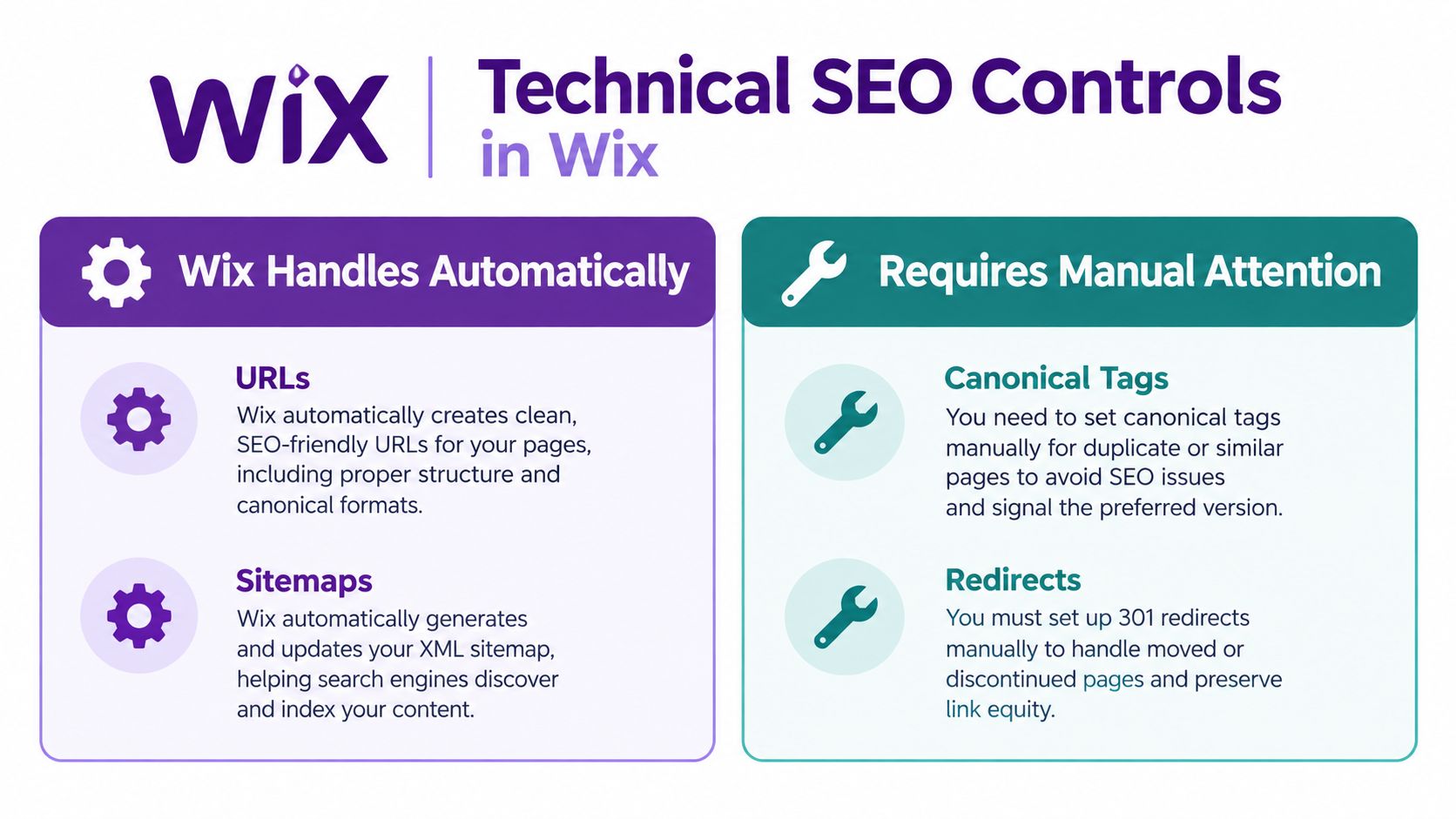
Wix provides standard mechanisms for URLs, sitemaps, robots directives and other foundational controls. The owner still decides whether the resulting structure makes sense, whether legacy pages should redirect and whether similar pages need canonical handling.
Control | Wix default | Manual action needed |
|---|---|---|
URLs | Wix generates page URLs and slugs | Review naming, remove unnecessary complexity and preserve useful legacy destinations |
Sitemaps | Wix maintains sitemap functionality | Check that important pages are represented and unwanted areas aren't creating confusion |
Canonical tags | Platform settings support canonical control | Review duplicated or near-duplicated pages and confirm the preferred URL |
Redirects | Wix supports redirect management | Map old URLs after migrations, restructures or service renaming |
Robots directives | Wix provides indexation controls | Confirm that priority pages can be crawled and that private or low-value areas are handled intentionally |
Response status | Wix exposes diagnostic reporting | Investigate errors, blocked pages and unexpected responses rather than assuming a content issue |
The operational question is always the same: can a search engine reach, interpret and select the URL you want to rank?
Use logs to diagnose instead of guessing
Wix's SEO reports expose response-status information and bot traffic. That gives you a more useful starting point than repeatedly editing copy on a page that may be returning an unexpected response or receiving no meaningful crawl attention.
Review the highest-value URLs first. Check old service URLs after a redesign, newly published location pages, dynamic collection pages and pages affected by app installations. An app can improve bookings or merchandising while also adding scripts, templates or URLs that make the site harder to manage. Inspect the result, don't assume the feature is harmless.
For deeper technical reviews, technical SEO support from Scéaled can be used alongside Wix reporting to prioritise crawlability, redirects, page structure and measurement issues.
Diagnostic rule: Fix the response and indexation problem before rewriting a page that search engines may not be processing correctly.
Keep local business information consistent
Local SEO depends on more than adding “Dublin” to a page title. Keep the business name, address, phone number and opening information consistent wherever the business appears. Make the service area explicit, link the relevant location page from the navigation or service journey and ensure the Google Business Profile reflects the operation.
Wix can support the website side of that system, but it doesn't replace the work of maintaining local listings, earning relevant mentions or creating useful location content. A location page with a swapped-out town name and no local substance won't give an Irish business a durable advantage.
Speed Mobile and Structured Data for AEO Readiness
Page speed, mobile usability and structured data should be managed together because they affect discovery, interpretation and lead capture. A fast page still needs clear business information for answer engines to use. Markup adds context, but heavy scripts or awkward mobile layouts can cost enquiries.
Start with commercially important pages
Wix reported a platform-level improvement that increased the ratio of Wix sites in Google's CrUX report with good scores for all three Core Web Vitals by 10x, as stated in Wix's SEO platform guidance. Treat that as platform context, not a page-level guarantee. Your template, apps, media and dynamic elements still determine the experience on each URL.
Start with pages that generate enquiries or represent high-value services. Keep layouts lean, compress images before uploading them, remove decoration that does not support the decision and limit third-party scripts. Test on mobile, especially forms, phone links, booking controls and navigation. A visitor who cannot complete the next action will not become a lead, regardless of ranking.
Use Wix reports to review response status and bot activity, then use Google's performance diagnostics for page-level Core Web Vitals checks. Record the change you made and review search and conversion behaviour afterwards. A diagnostic score matters only when it leads to a fix.
Make pages clear for answer engines
Answer-engine optimisation and generative engine optimisation need information that can be extracted without guesswork. Put the direct answer near the relevant heading, explain services and locations plainly, answer common questions concisely and keep business details consistent. For an Irish SME, that means stating where you operate, who you serve and what a visitor should do next.
Structured data can provide context for business, FAQ, product, article and other eligible page types. Wix offers markup options for supported content, including default markup for some app content. Check every implementation against the visible page. Do not mark up reviews, services or details that visitors cannot verify.
Wix's 2026 SEO and GEO learning hub covers personalisation for AI, GEO tools and SEO plus GEO education. Those developments are useful, but local demand capture still depends on active work. Maintain the Google Business Profile, build useful service and location pages, keep NAP details accurate, earn relevant external authority and track conversions. Review the latest SEO updates when platform and search behaviour changes affect your priorities.
Use a prioritised fix list
Remove weight: Review apps, scripts, video backgrounds and oversized media on priority URLs.
Improve mobile actions: Make phone links, forms, booking controls and key navigation usable without zooming or hunting.
Clarify entities: State the business, services, locations, audiences and proof in language visitors and machines can interpret.
Validate markup: Confirm that structured data matches visible content and supported page types.
Track movement: Compare technical changes with impressions, clicks, average position and key events.
This process connects technical SEO with local lead capture and AEO readiness. It is more useful than adding a GEO label to a page and waiting for an AI system to recommend it.
Measure Improve and Keep Your Wix SEO Growing
SEO in Wix should run on evidence, not on the feeling that a page “looks optimised”. Wix reporting can surface impressions, clicks, average position, queries and bot traffic. That gives an Irish SME enough information to decide whether a page needs stronger relevance, better click appeal, technical repair or a clearer route to enquiry.
Connect those signals to commercial results. The Ireland-focused data referenced earlier found that organic traffic produced 54% of tracked key events in 2025, up from 44% in 2024, with a 52% year-over-year increase in key events from organic sources in its Wix and Ireland visibility dataset. Treat those figures as a reason to connect reporting with enquiries, not as a promise that every Wix site will achieve the same outcome.
Run a simple review rhythm
Keep the weekly review short and operational:
Query changes: Find new queries generating impressions and check whether the relevant page answers them clearly.
Click gaps: Identify pages with visibility but weak click appeal, then improve the title and meta description.
Position movement: Compare recent technical or content changes with movement in average position.
Lead quality: Review forms, calls, bookings and sales, not sessions alone.
Local signals: Check branded and service-area visibility, Google Business Profile activity and location-page performance.
A monthly review should examine pages losing clicks, merge overlapping content where appropriate, refresh outdated service information and add internal links from relevant articles. Compare new pages with their intended commercial role, such as a service enquiry, phone call or booking.
Make ownership visible
Assign one person to record the change, affected URL, reason and expected result. Without that record, several edits can happen together, leaving the team unable to identify what helped or caused a new issue.
The durable advantage: A Wix site improves when someone repeatedly turns search data into specific page, technical and conversion decisions.
Use the SEO Assistant for page-level prompts, then check the work with Search Console validation, Wix log reporting, manual mobile reviews and real enquiry data. That combination shows whether the site is merely accessible or earning demand, and whether pages are ready to answer the clearer questions used in AEO and GEO.
Start with the highest-value Wix pages. List the URLs that should generate business, verify indexation and response status, review their search queries, then make one documented improvement before publishing anything new.
Scéaled helps Irish businesses audit Wix foundations, improve priority pages, build technical SEO and AEO readiness, and connect organic visibility with qualified enquiries. Visit Scéaled to discuss a practical SEO and growth plan built around your site, market and commercial goals.
Comments